Facebook marketing is the process of using Facebook’s tools—Pages, Ads, content, and analytics—to promote a business, engage audiences, and drive conversions. In 2026, effective Facebook marketing starts with setting up a business page and ads account, then building a clear Facebook marketing strategy based on goals, audience targeting, content planning, and budgeting. Businesses that succeed consistently review performance, engage with their audience, and use tools like Meta Business Suite, Ads Manager, and AI-powered platforms to scale results efficiently.
Table of Contents
While video-first platforms like TikTok often grab attention, Facebook remains a key marketing platform for businesses in Malaysia in 2025.
According to NapoleonCat’s Facebook user statistics (December 2025), Malaysia has approximately 31.84 million Facebook users, accounting for nearly 90% of the country’s population. This makes Facebook one of the most widely used and accessible social media platforms for reaching local audiences in Malaysia.
Demographic data further shows that the 25–34 age group is the largest segment of Facebook users in Malaysia, followed by users aged 18–24 and 35–44. These age groups represent working adults with strong purchasing power, confirming that Millennials and Gen Z continue to actively use Facebook for communities, recommendations, and brand discovery.
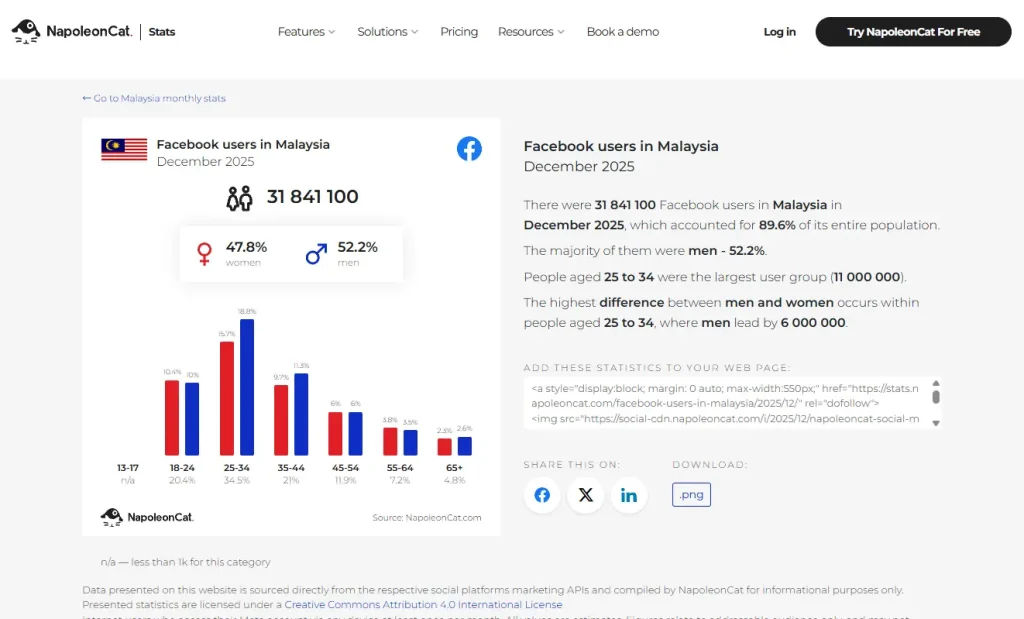
Most importantly, Facebook marketing does not require a large budget to be effective. With a large local user base and precise audience targeting options, Facebook remains a cost-effective channel for Malaysian SMEs and brands to generate consistent leads and measurable ROI in 2025.
What Is Facebook Marketing?
Facebook marketing refers to the use of Facebook’s tools and features to promote a business, brand, product, or service. It helps businesses reach their target audience, increase engagement, generate leads, and drive sales through a combination of organic content and paid advertising.
Facebook marketing includes a wide range of strategies, such as:
- Organic Facebook posts (text, images, and videos)
- Paid or boosted content, including Facebook ads
- Facebook Reels, Stories, and Live videos
- Facebook Pages and Groups for community building
- Facebook Messenger ads, chatbots, and automated replies
- Influencer and user-generated content (UGC)
- Facebook Shops and Marketplace
- Facebook Events and campaign-based promotions
How to Set Up Facebook for Business
To start marketing on Facebook, the first step is to set up a Facebook Page. Your Page acts as the foundation of your entire Facebook marketing strategy. It’s where people can follow your brand, engage with your content, and learn more about your business. More importantly, having a Page allows you to access advanced marketing tools, such as paid advertising and audience insights.
To get the most out of Facebook marketing for your business, you’ll need to complete a few key setup steps:
- Create a Facebook Page
- Verify your Facebook Page
- Create a Facebook Ads account
Each of these steps is important for building credibility, unlocking advertising features, and ensuring your business is ready to scale on Facebook. Let’s walk through how to set up each one properly.
Create a Facebook Page for Your Business
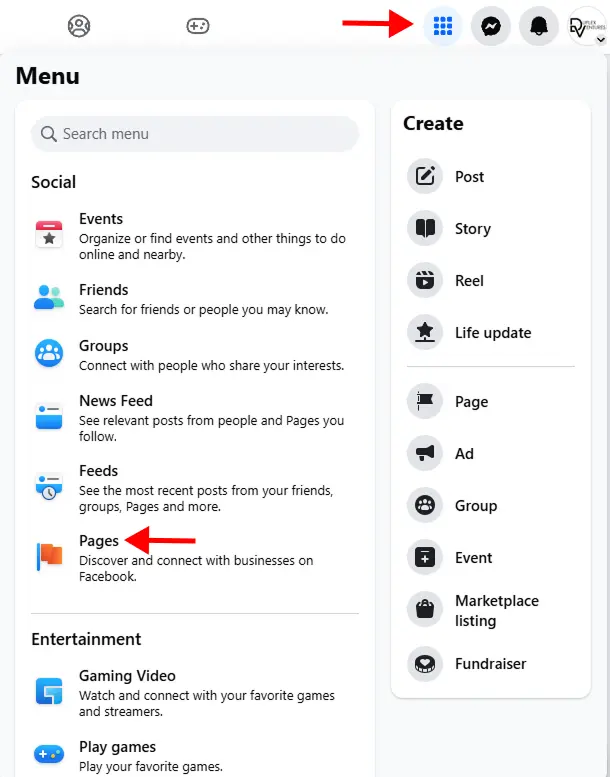
To set up a business Facebook Page, you’ll need to use your personal Facebook account. Log in to Facebook, then click the menu icon at the top right next to your profile photo and select Pages.
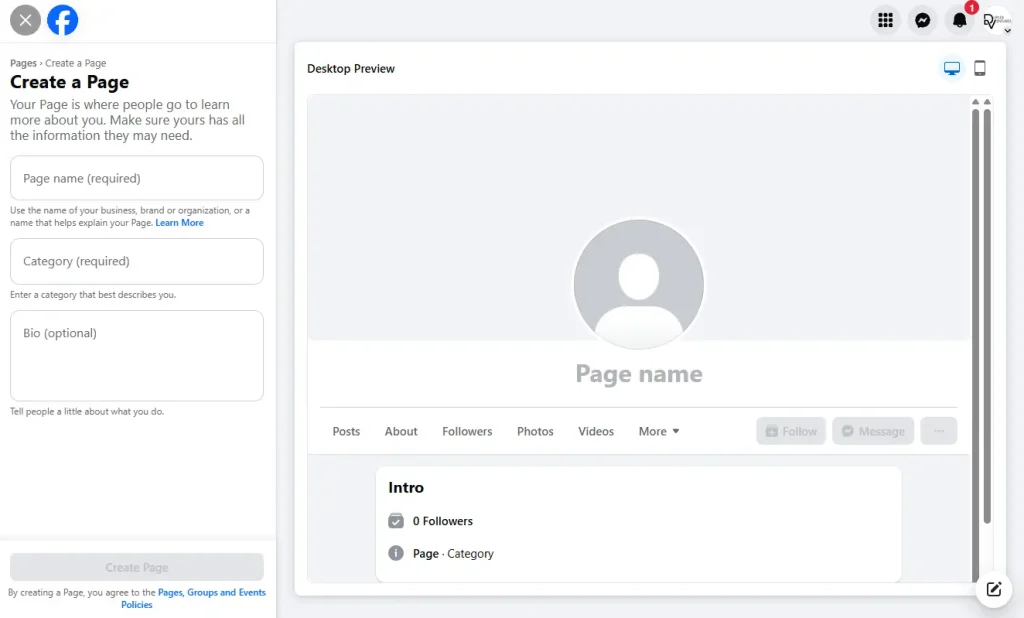
Click Create a new profile or Page at the top left. Enter your business name, choose a relevant category, and add a short description of your business. You’ll see a live preview of your Page on the right side as you fill in the details. Once ready, click Create Page.
Your Facebook Page will be live immediately. After that, you can continue optimising it by adding contact details, a website URL, business hours, and profile and cover images. You can also connect your Instagram account, assign Page admins, and fine-tune settings to improve visibility and management.
Verify Your Facebook Page (Optional)
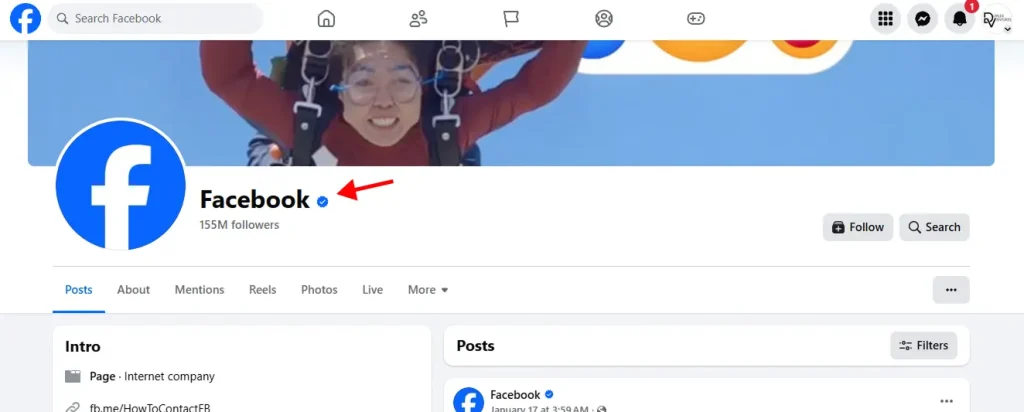
Facebook Page verification helps build trust by confirming your brand’s authenticity. Verified Pages display a blue checkmark next to the Page name, which reassures users that your Page is official.
To qualify for verification, your Page usually needs to represent a recognisable public figure, brand, or business. If your brand isn’t widely known yet, there’s another option available: Meta Verified.
Meta Verified is a paid subscription that allows businesses and creators to receive a verified badge across Facebook, Instagram, and WhatsApp. It also includes impersonation protection, access to Meta support, and additional discovery-related features. While recognition isn’t required, eligibility requirements still apply.
Create a Facebook Ads Account
Even if you’re not planning to run ads immediately, setting up a Facebook Ads account early ensures everything is ready when you decide to start.
Log in to Facebook using the profile that has admin access to your Page, then go to Meta Ads Manager. Before running ads, you’ll need to add your business details and payment information.
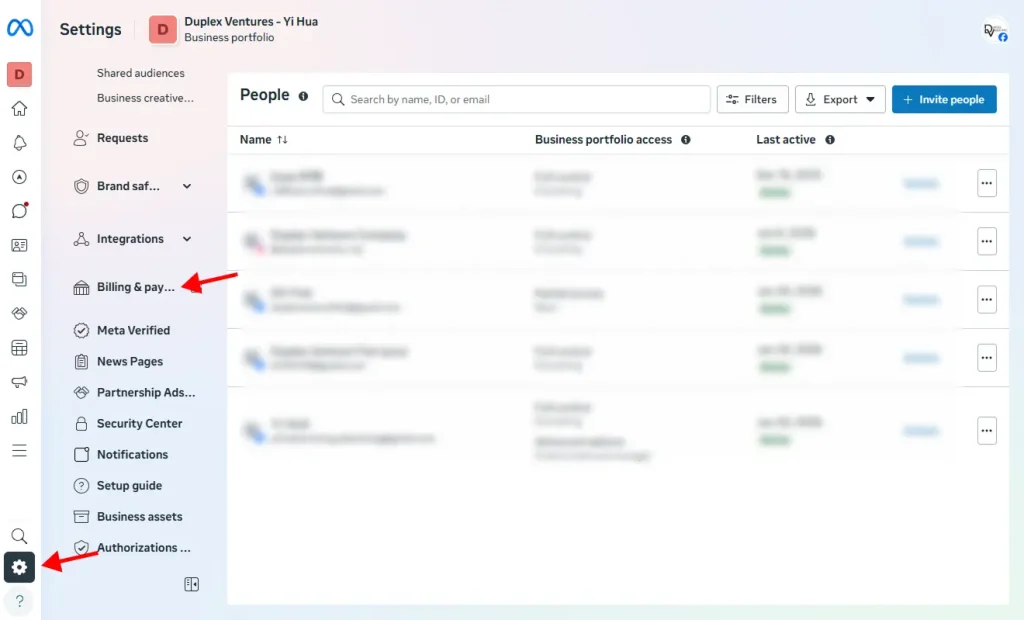
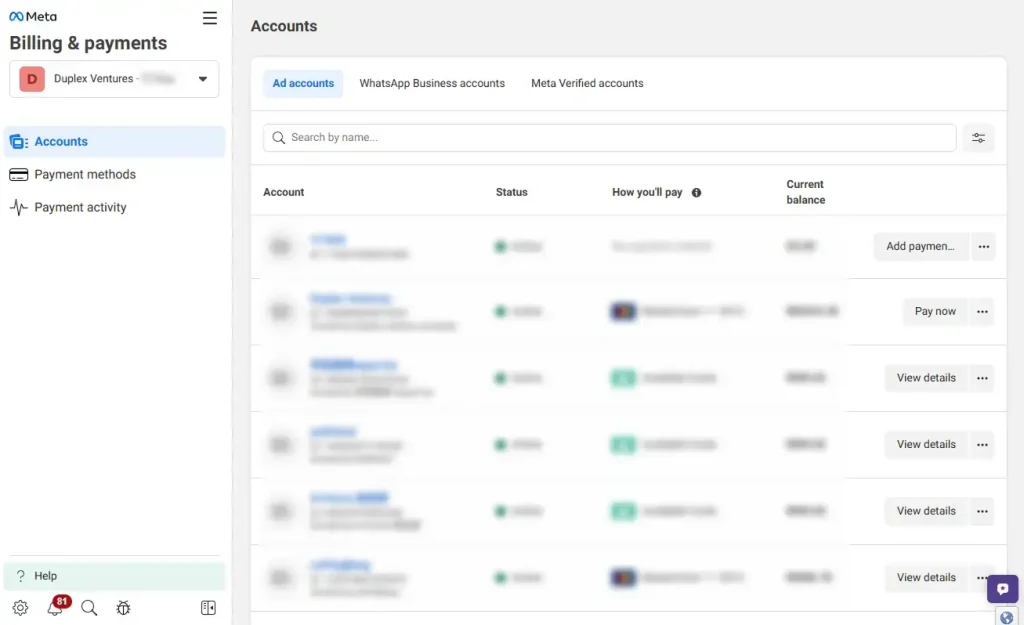
Alternatively, you can complete this setup through Meta Business Suite. Go to Settings, then Billing and payments, where you’ll see your ad account listed. Click View details and follow the prompts to complete any missing information. Once your payment method is added and everything is verified, your ads account will be ready to use.
Not sure how to get started with Facebook advertising? A step-by-step guide can help you understand the basics.
How to Create a Facebook Marketing Strategy in 8 Easy Steps
1. Define Your Facebook Marketing Goals
Before using Facebook for marketing, you need to know what you want to achieve. Having a clear goal helps you plan your content and measure results.
Ask yourself what Facebook should do for your business. For example:
- Increase brand awareness
- Grow followers
- Drive sales online or in-store
- Get leads
- Build a community
There’s no right or wrong goal. Just choose one that matches your business needs, and let it guide your content and advertising decisions.
2. Define Your Audience
Before posting on Facebook, you need to know who you are trying to reach. Think about your ideal customer and what they want to see on Facebook.
This is important because good Facebook marketing focuses on your audience, not just what you want to post. When your content matches their interests, people are more likely to engage.
At a basic level, ask yourself:
- How old are they?
- Where do they live?
- What do they do for work? (especially for B2B)
- What problem do they have, and how can you help?
- When do they usually use Facebook?
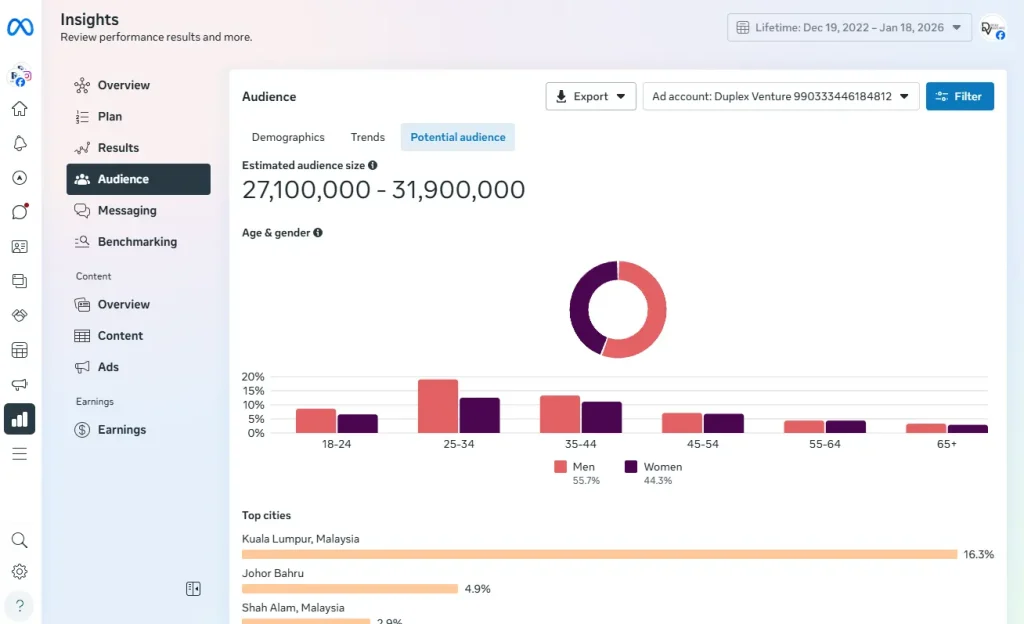
If you already have followers, you can check Audience Insights in Meta Business Suite to learn more about them. See if the data matches the audience you want. If not, adjust your content and keep testing.
Understanding your audience also helps a lot when you start running Facebook ads, as it improves targeting and results.
3. Create a Facebook Content Strategy
Your Facebook content strategy doesn’t need to be complicated. It should be simple and flexible. If a type of post doesn’t work, you can always try something else. The key is to know why you are posting, instead of posting randomly.
Start by making sure your content matches your brand, such as your colours, design style, and tone of voice. Then decide what kind of content your audience wants to see. This could be tips, updates, promotions, or behind-the-scenes posts.
A helpful way to plan is to group your posts into content “buckets.” For example:
- Tips or educational content
- Company updates
- Customer reviews
- New products or promotions
Try to keep a balance. Most of your posts should be helpful or interesting, and only some should promote your products or services.
Use a mix of post types like text posts, images, videos, Reels, and Stories. Most posts will go on your Facebook Page, but you can also use Groups, Live videos, or Events.
With a simple plan in place, your Facebook content will be easier to manage and more engaging over time.
4. Post at the Right Times
After deciding what to post, the next step is choosing when to post. Posting at the right time helps more people see and interact with your content.
Tools like Audience Insights can show you when your audience is most active on Facebook. In general, research suggests that posting around 9 a.m., from Wednesday to Saturday, often works well.
However, this is only a general guide. Every audience is different, so try posting at different times and see which ones get the most likes, comments, and shares. Over time, you’ll learn what works best for your Page.
5. Set Your Facebook Marketing Budget
Your Facebook marketing budget depends on your goals and how much you can afford to spend. In Malaysia, many small businesses start with RM500 to RM1,500 per month to test Facebook ads and see what works.
You can control your spending by setting daily or monthly limits, and you can adjust or stop your ads at any time. Even a small budget can be effective if your ads target the right audience.
6. Engage With Your Audience
Facebook marketing is not just about posting content. It’s about interacting with people. To grow your audience and encourage action, you need to reply to comments, messages, and questions regularly.
Try to spend a little time each day responding to comments and messages, and remove spam when needed. This helps build trust and shows that your business is active and responsive.
7. Scale Your Facebook Marketing With AI and Tools
As your Facebook activity grows, replying to every message manually can take a lot of time. This is where AI tools and automation can help.
One useful option is using Facebook Messenger chatbots. Millions of people message businesses on Facebook every week, and chatbots allow you to reply automatically to common questions, collect leads, and respond faster without extra effort.
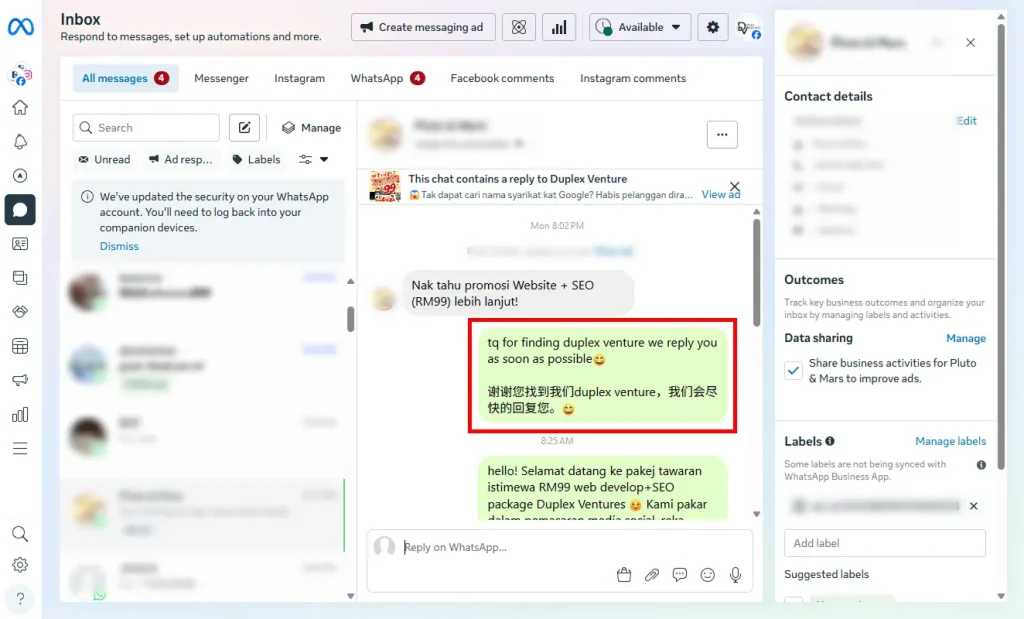
Facebook also offers free tools through Meta that allow you to set up basic automated messages. This makes it easier to support customers and capture enquiries, even when you’re offline.
8. Review Your Performance Regularly
Your Facebook marketing strategy will change over time, so it’s important to check what’s working and what’s not. Reviewing your results helps you improve and make better decisions.
Start by checking your Facebook analytics regularly to see how your posts are performing. A simple audit should include:
- Listing all your social media accounts and making sure they are still relevant
- Checking your branding, such as profile photos, cover images, and visuals
- Reviewing your content to see which posts get the most engagement
This helps you understand what your audience likes and what you should improve. By reviewing your performance regularly, your Facebook marketing becomes more effective over time.
4 Facebook Marketing Tools
To manage Facebook marketing more easily, it helps to use a mix of Facebook’s built-in tools and third-party platforms.
Here are four commonly used tools:
1. Meta Business Suite
Facebook’s main tool for scheduling posts, replying to messages, viewing Insights, and managing Facebook and Instagram in one place.
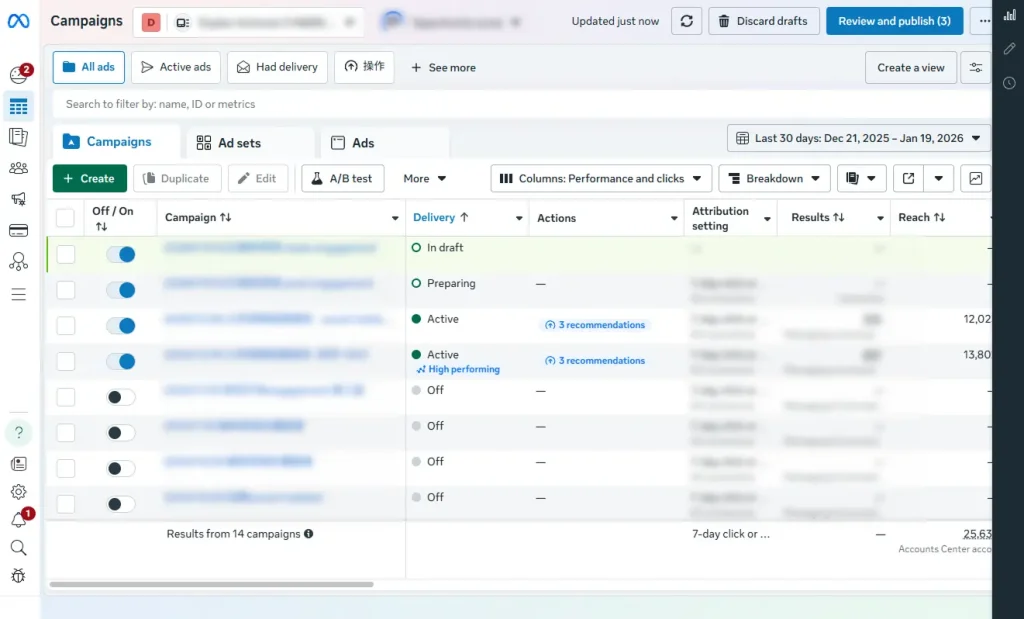
2. Facebook Ads Manager
Facebook’s main tool for scheduling posts, replying to messages, viewing Insights, and managing Facebook and Instagram in one place.
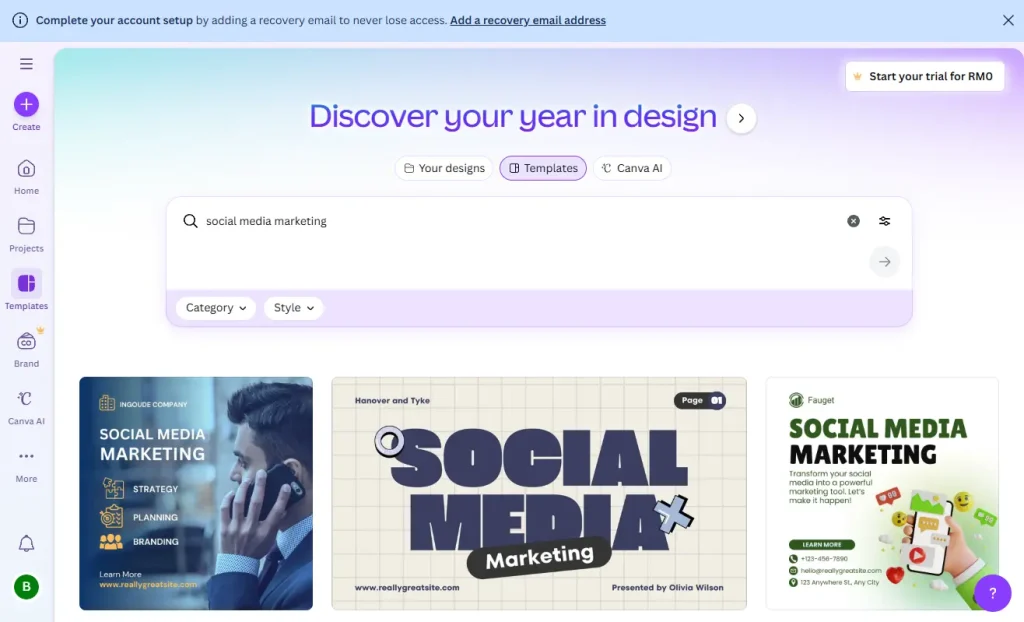
3. Canva
A simple design tool for creating images, videos, and Stories for posts and ads, even if you don’t have design experience.
4. Hootsuite, Buffer, or Sprout Social
Third-party tools that help schedule content, manage engagement, and analyse performance across multiple platforms.
Using the right tools can save time, keep your content organised, and make Facebook marketing easier to manage as your business grows.
Take Facebook Marketing to the Next Level
Now that you understand how Facebook marketing works, it’s a good time to start using it for your business. If you don’t have a Facebook Page yet, create one and begin sharing content to reach potential customers.
If your business is new, start with organic posts to build awareness and engagement. As your business grows, you can explore paid ads to reach more people and retarget users who have already interacted with your brand.
You can also connect Facebook with other marketing channels, such as email, to create a more consistent experience for your audience.
If you’d prefer professional support, Duplex Ventures can help you plan, manage, and grow your social media marketing, from content strategy to paid Facebook advertising, so you can focus on running your business.
Ready to Grow Your Brand on Facebook?
Frequently Asked Questions
What is the difference between facebook marketing and social media marketing?
Facebook marketing focuses specifically on Facebook’s ecosystem, while social media marketing covers all platforms.
Is facebook marketing still effective in 2026?
Yes, especially when combined with video content, ads, and WhatsApp conversion.
How long does facebook marketing take to work?
Some results appear in days, but consistent growth takes weeks to months.
Do I need ads for facebook marketing?
Organic content helps, but ads are usually required to scale.
Is facebook marketing suitable for small businesses?
Yes. With the right strategy, SMEs can compete effectively.
Visit our page if you need more details.
Also Read:
- What Is Facebook Ads and How Does It Work?
- What Is Social Media Marketing? A Complete Guide
- Website vs. Social Media: Which is Best for Your Business? (2026)
- Top 10 Social Media Marketing Agencies in Malaysia (2026)
- 10 Benefits of Social Media Marketing for Businesses
- Digital Marketing Agency vs Freelancer in Malaysia (2026)
- Social Media Advertising vs. Social Media Marketing
Stay Connected: Website | Facebook | Instagram | TikTok | Lemon8 | Xiaohongshu
Share This Article: