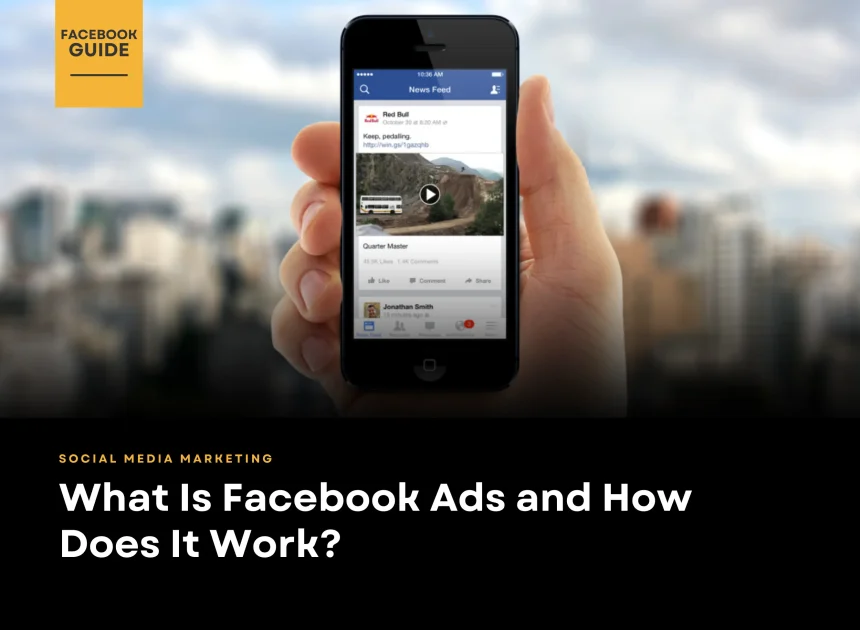
Facebook Ads is a paid advertising platform by Meta that helps businesses reach specific audiences on Facebook and Instagram. It works through an auction system: you choose a goal (like WhatsApp messages, leads, or sales), define your audience, set a budget, and Meta shows your ads to people most likely to take that action. You only pay based on the result type (such as clicks, impressions, or conversions). Strong creatives, correct targeting, and conversion tracking are what make Facebook Ads profitable.
Table of Contents
Facebook Ads is one of the most effective online advertising tools for businesses today. With billions of active users on Facebook (Meta), brands can reach the right audience at the right time using precise targeting, flexible budgets, and measurable results. In this guide, we’ll explain what Facebook Ads are and how they work to help businesses in Malaysia grow online.
What Are Facebook Ads?
Facebook ads are paid posts that allow businesses to promote their products or services to targeted users on Facebook.
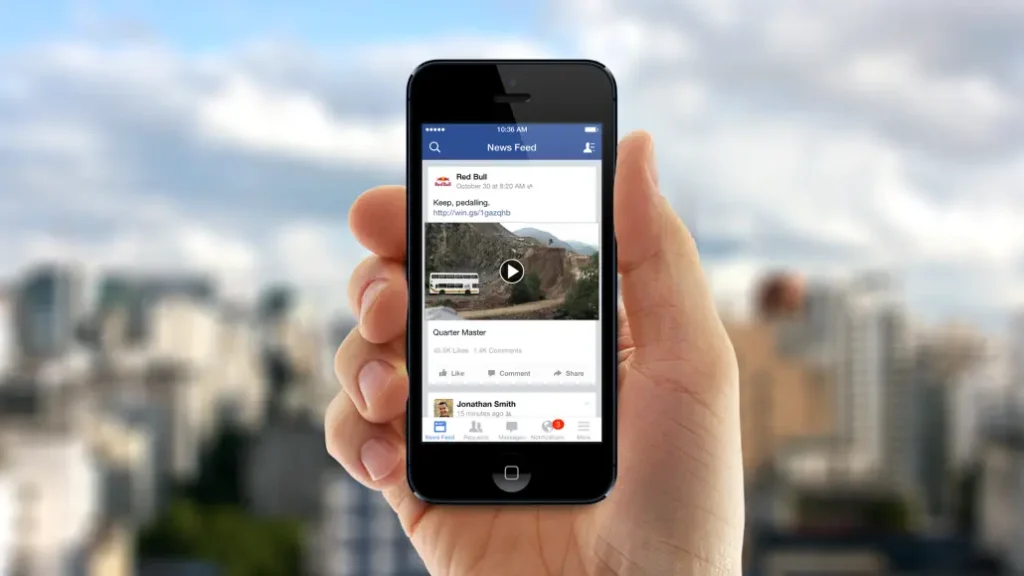
These ads come in various formats, including image ads, video ads, and carousel ads. They can appear across multiple placements within the platform, such as News Feed, Stories, Messenger, Marketplace, and other areas of the app.
How Facebook Ads Work (Quick Overview)
Facebook ads are shown to users based on detailed targeting, including:
- Demographics (age, gender, job title)
- Location (country, city, radius targeting)
- Interests & behaviours
- Profile data & online activity
Advertisers set a budget and either:
- Bid per click (CPC), or
- Bid per 1,000 impressions (CPM)
Facebook’s system then delivers ads to users most likely to take action.
What Makes Facebook Ads Different?
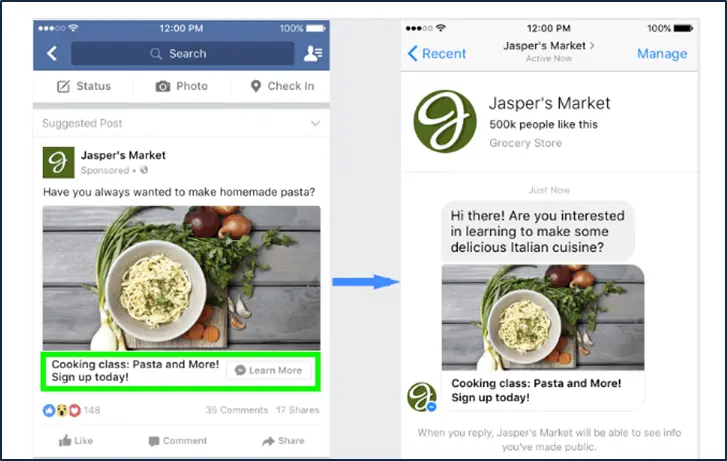
Although Facebook ads look similar to regular posts, they always include a “Sponsored” label. Compared to organic posts, ads also offer advanced features such as:
- Call-to-action (CTA) buttons (Shop Now, Contact Us, Learn More)
- Clickable links
- Product catalog & dynamic ads
- Conversion and lead tracking
Why Facebook Ads Matter
If your goal is to reach more people faster, Facebook ads should be a core part of your Facebook marketing strategy. They help businesses:
- Increase brand visibility
- Drive website traffic
- Generate leads and sales
- Retarget users who already interacted with your brand
Used correctly, Facebook ads deliver measurable results and scalable growth.
Want to go deeper? Explore more Facebook marketing tips to maximise your ad performance.
Types of Facebook Ads
Before launching a campaign, it’s important to understand the different types of Facebook ads available and what each format is best used for. Using Facebook Ad Manager, businesses can choose from a wide range of ad formats to match specific goals such as awareness, engagement, leads, or sales.
1. Image Ads
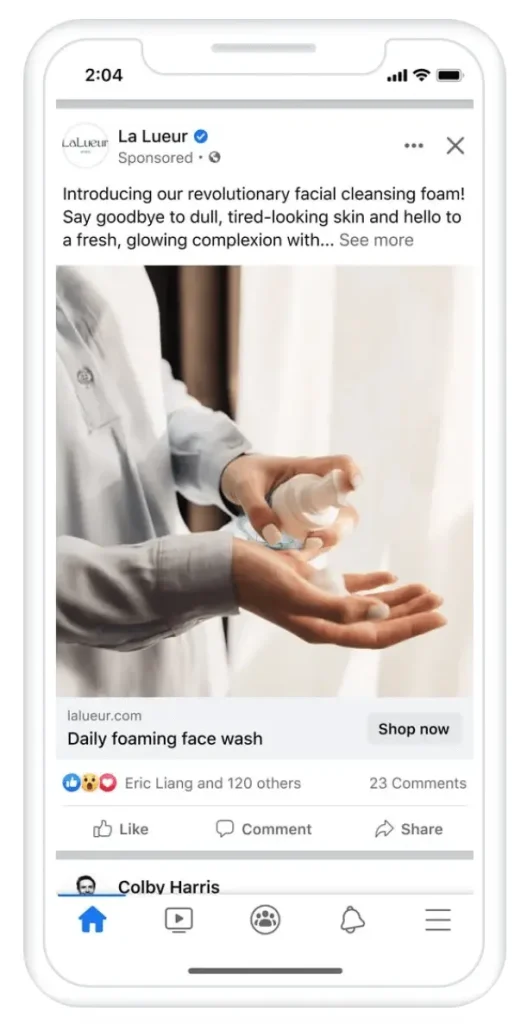
Image ads are one of the most common and simplest Facebook ad formats. They use a single image combined with a headline and description to capture attention quickly.
They work especially well for promoting special offers, announcements, or specific products with a clear message.
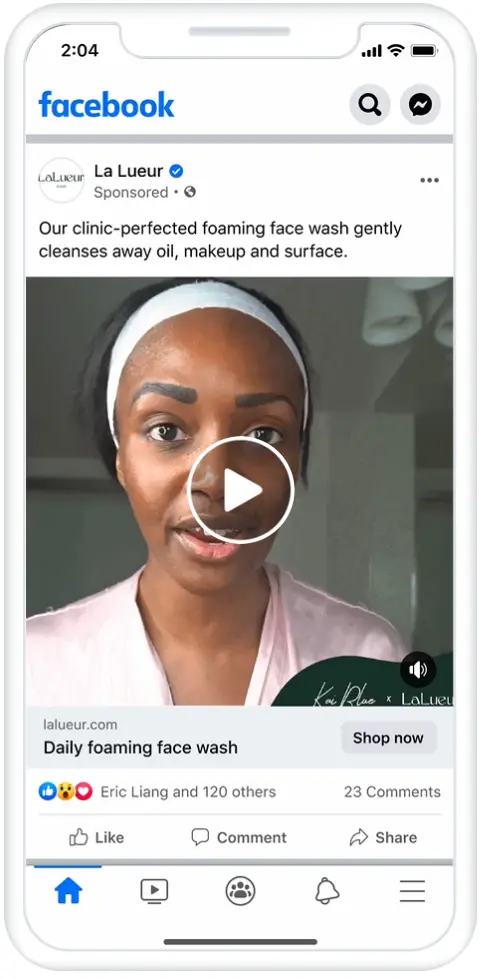
2. Video Ads
Video ads are increasingly popular due to their ability to tell stories and showcase products in action. They can appear in Facebook News Feed, Stories, or within longer Facebook videos.
Facebook tracks how long users watch each video, allowing advertisers to build retargeting audiences based on viewing behaviour.
3. Poll Ads
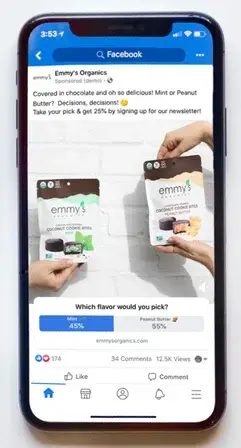
Poll ads are a mobile-only format that adds a two-option poll to an image or video ad. Both advertisers and users can see the results in real time.
This format is useful for increasing engagement and gaining direct insights into audience preferences.
4. Carousel Ads
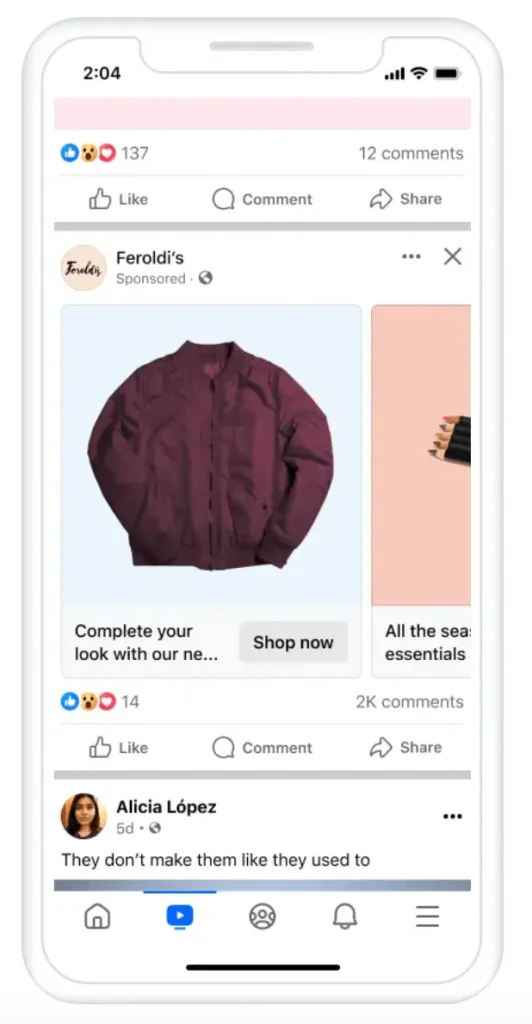
Carousel ads allow up to 10 images or videos within a single ad. Each card can highlight a different product, feature, or update.
Each image or video can include its own link, making it easier for users to explore specific items on your website or online store.
5. Collection Ads
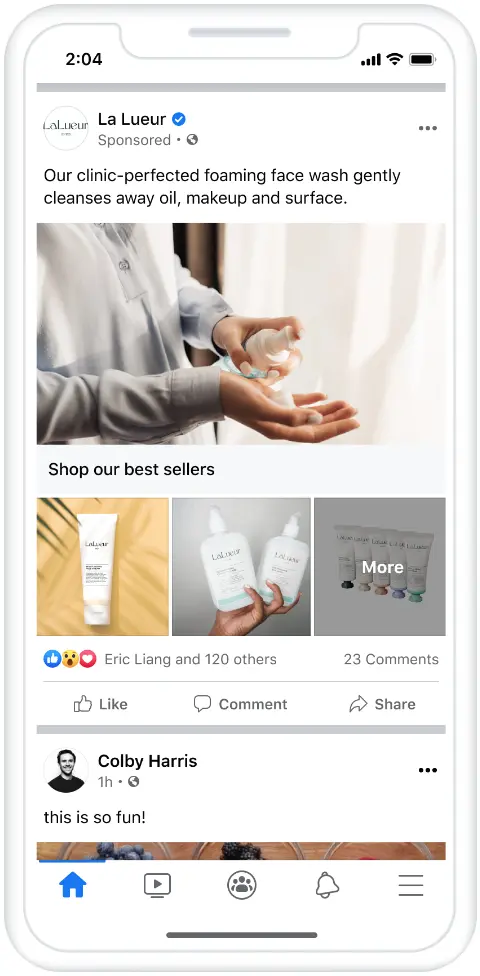
Collection ads are a mobile-only format designed to help users browse and purchase products easily.
Customers can explore your product collection directly within Facebook, without leaving the app.
6. Instant Experiences Ads
Previously known as Canvas, Instant Experiences ads are full-screen, mobile-first ads that load faster than external websites.
They allow users to view videos, images, carousels, and tagged products all within a single immersive experience.
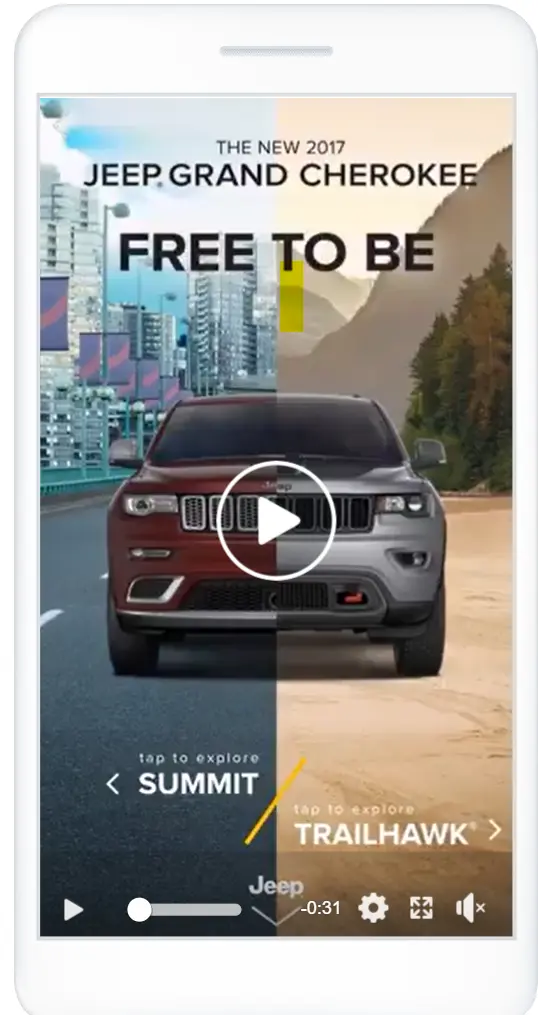
7. Lead Ads
Lead ads are designed to collect contact details such as email addresses or phone numbers directly within Facebook.
They are commonly used for newsletter sign-ups, free trials, and consultation requests, reducing friction for users.
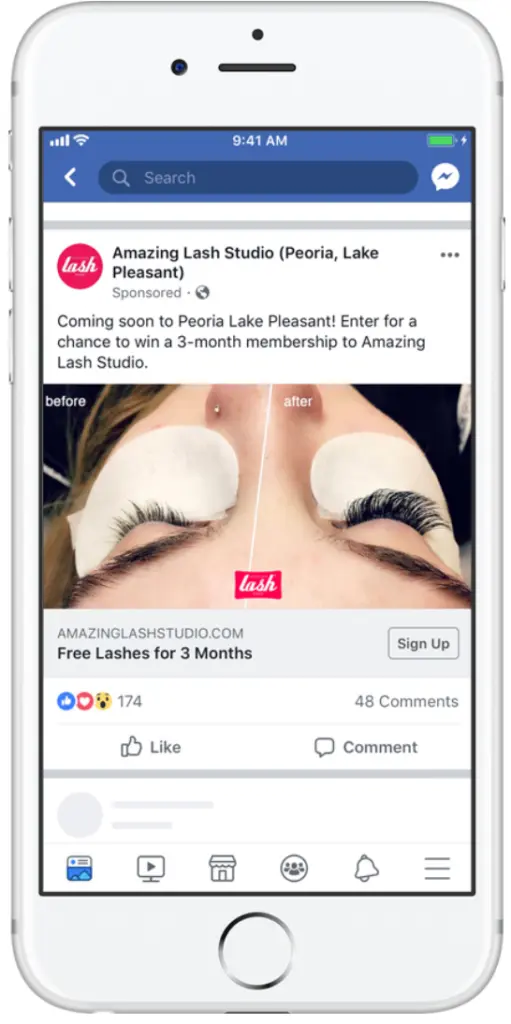
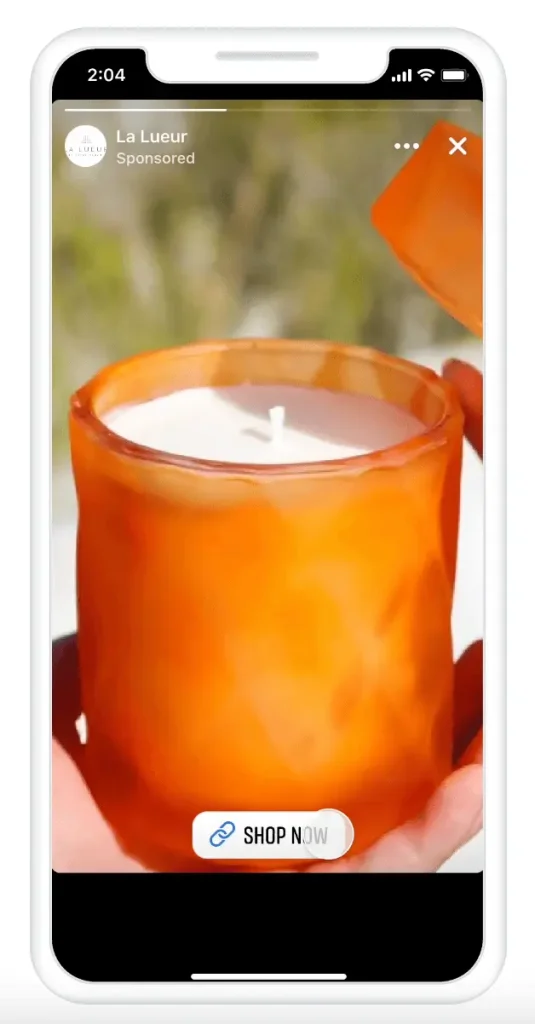
8. Stories Ads
Stories ads are full-screen, vertical ads built specifically for mobile users.
As Facebook Stories continue to grow in popularity, this format offers a strong opportunity to deliver high-impact, visually engaging ads.
If you want facebook ads that actually brings WhatsApp leads, Duplex Ventures can help you plan the funnel, write the ad copy, design creatives, set up tracking, and optimize weekly.
How to Set Up Facebook Ads Using Meta Ads Manager (8 Steps)
If you already have a Facebook Business Page, you can start advertising directly through Meta Ads Manager (previously Facebook Ads Manager). If not, you’ll need to create a Business Page first before running any ads.
This guide focuses on using Ads Manager, which is the main tool for creating, managing, and tracking ads across Facebook and Messenger. (If you prefer using Meta Business Manager, you can refer to Meta’s dedicated Business Manager guide.)
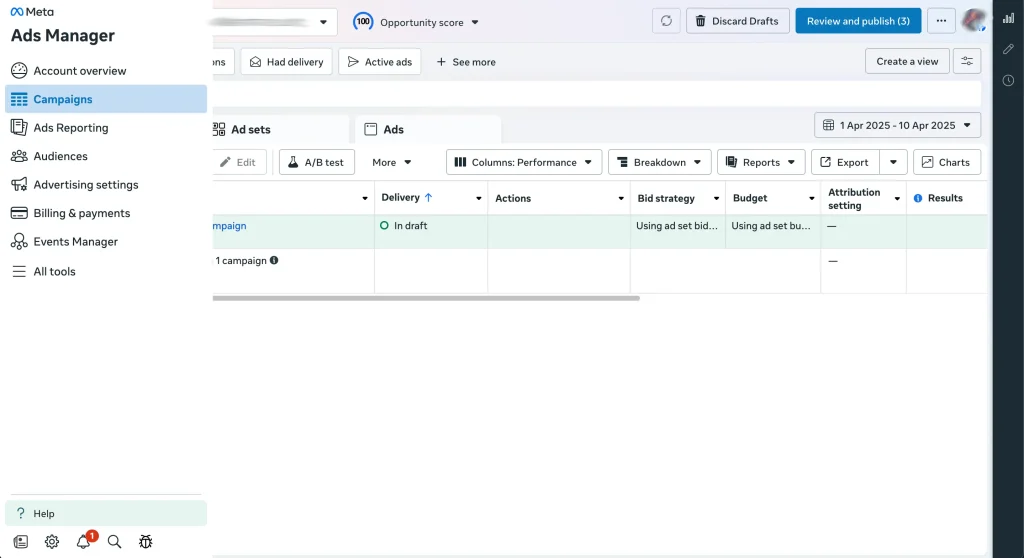
Step 1: Create a New Ad
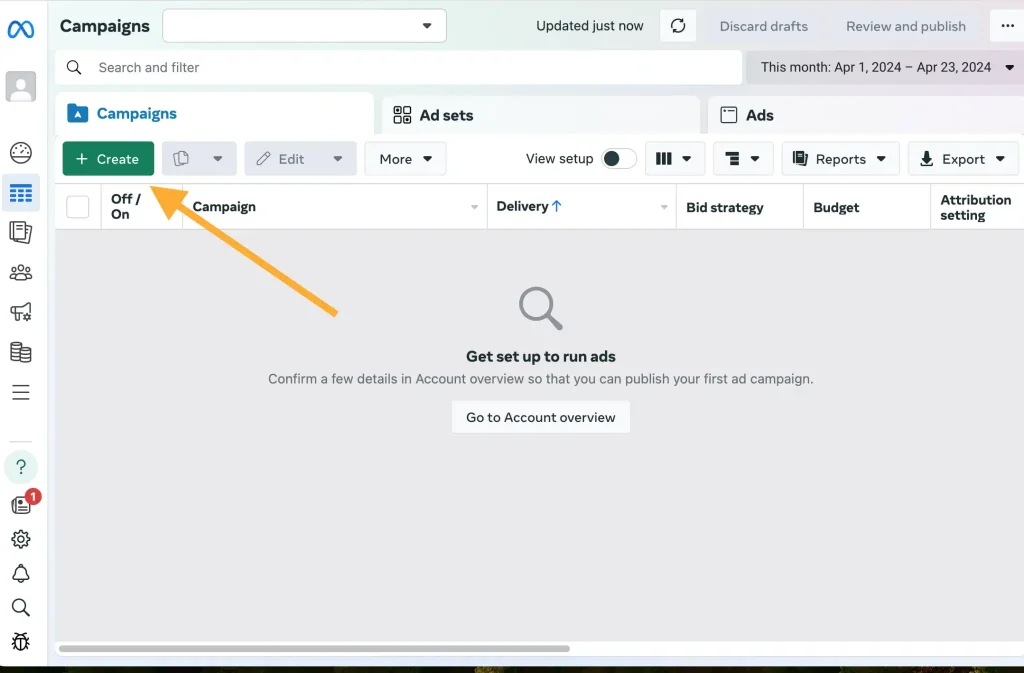
Log in to Ads Manager and open your dashboard. Click the Create button to start a new campaign, ad set, or ad.
Step 2: Choose Your Campaign Objective
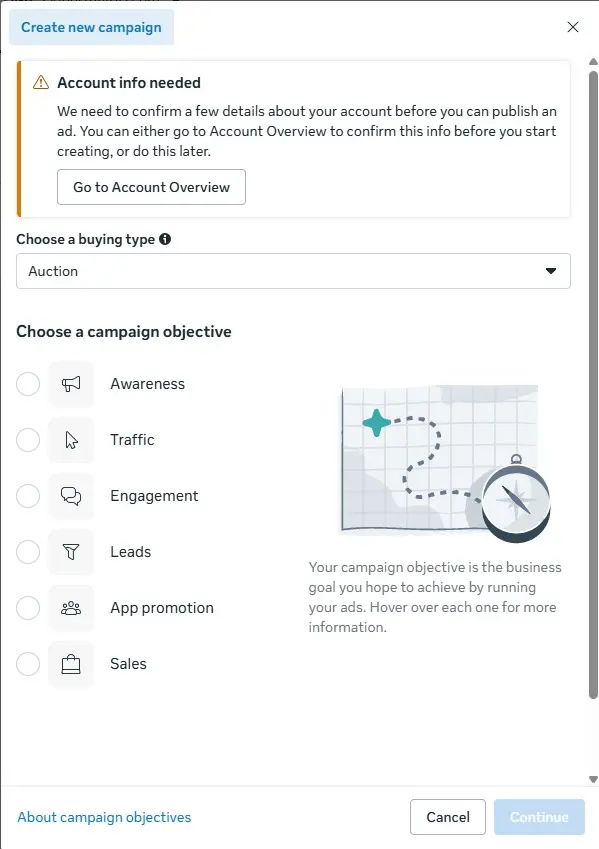
Select one of Meta’s six campaign objectives based on your business goal:
- Awareness – Increase brand visibility
- Traffic – Drive visitors to a website, app, or Page
- Engagement – Encourage likes, comments, shares, or messages
- Leads – Collect leads through forms, calls, or messages
- App Promotion – Drive app installs or in-app actions
- Sales – Generate purchases or conversions
Always choose the objective that matches what you want users to do.
Step 3: Set Up Campaign Details
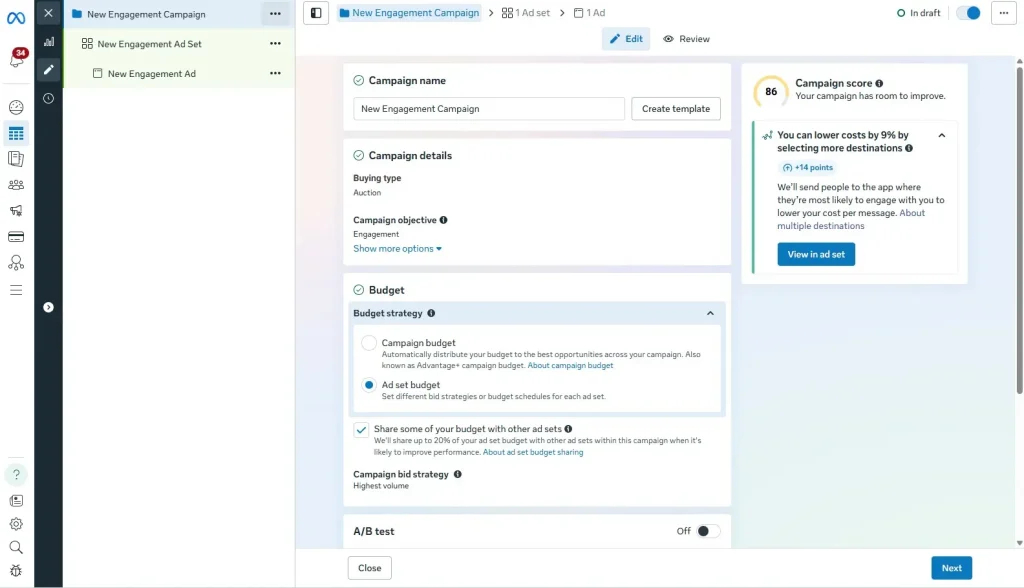
Name your campaign and indicate whether it falls under a Special Ad Category (such as credit, employment, or housing).
You can also enable A/B testing to compare different ad versions and see which performs better.
Step 4: Set Your Budget and Schedule
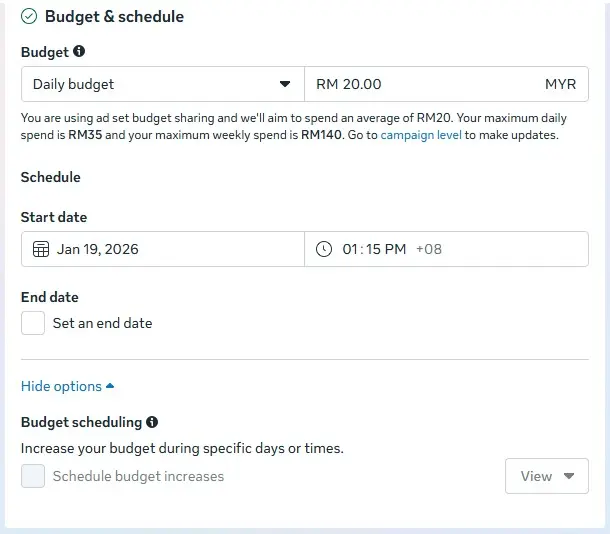
At the Ad Set level, choose how much you want to spend:
- Daily budget – Runs continuously with a daily minimum spend
- Lifetime budget – Runs over a fixed period
You can schedule your ads to start immediately or run at specific dates and times. Advanced scheduling allows you to spend more during high-traffic periods.
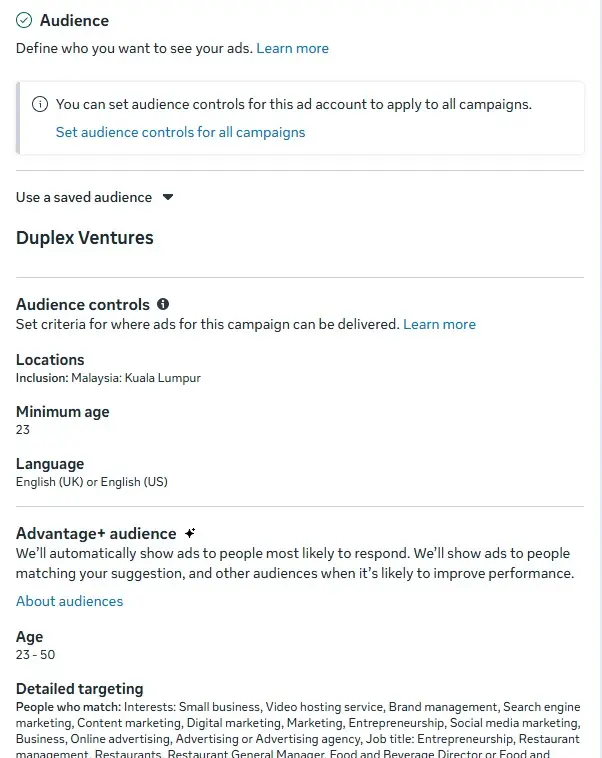
Step 5: Define Your Target Audience
You can either:
- Let Meta automatically find the right audience using Advantage+ targeting, or
- Manually set your audience based on age, location, language, interests, and behaviour
For beginners, Advantage+ is recommended, as Meta reports lower average costs and better performance when AI-driven targeting is used.
Step 6: Choose Ad Placements
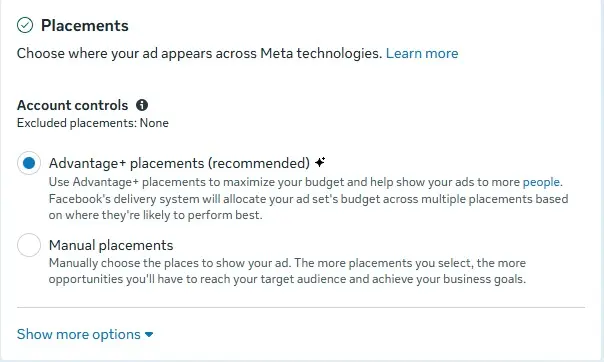
Decide where your ads will appear:
- Automatic (Advantage+) placements – Recommended for beginners
- Manual placements – Choose platforms and formats yourself
Manual options may include:
- Facebook, Instagram, Messenger, or Audience Network
- Feeds, Stories, Reels, in-stream videos, search, and apps
- Mobile, desktop, or specific operating systems
Start with automatic placements and optimise later based on performance data.
Step 7: Create Your Ad Content
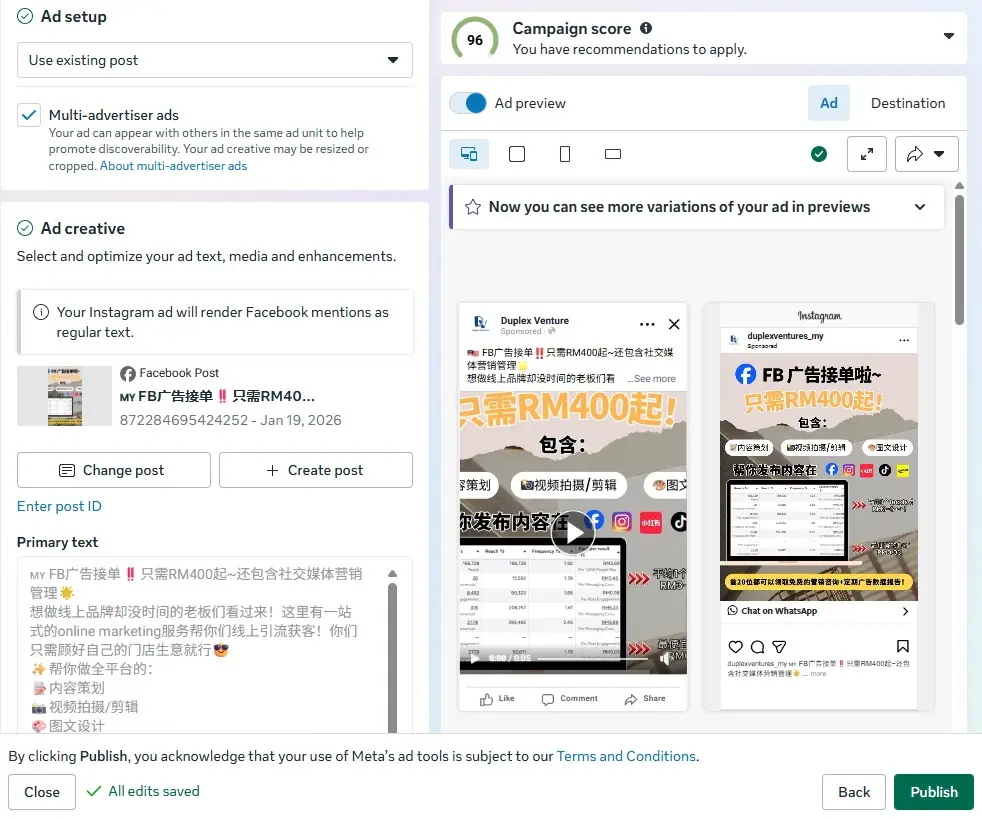
Select an ad format that fits your objective (image, video, carousel, etc.), then add your:
- Ad copy
- Media (images or videos)
- CTA button
Use Meta’s preview tool to check how your ad looks across all placements. Once ready, click Publish to launch.
Step 8: Monitor and Optimise Performance
After your ad is live, track key metrics in Ads Manager, such as:
- Reach and impressions
- Engagement and video views
- Clicks, leads, or conversions
You can adjust targeting, creatives, or budget based on results to improve ROI. If you use marketing tools like CRM or email platforms, integrations can help centralise performance and sales data.
Optimising Ad Performance Through Ongoing Testing and Refinement
Facebook advertising works best as an ongoing optimisation process, not a one-time setup. Campaigns should be continuously reviewed, tested, and refined to improve performance over time.
Ad Creative Testing
One of the most effective optimisation methods is ad creative testing. This involves running multiple variations of an ad to see what resonates best with your audience. For example, you can test:
- Single image ads
- Video ads
- Carousel ads
By comparing formats, visuals, headlines, and CTAs, you can identify which combination delivers higher engagement and conversions.
Audience Optimisation
Beyond creatives, audience optimisation plays a critical role in improving results.
Advanced tactics include:
- Exclusion targeting – Prevents ads from being shown to users who have already converted, helping reduce ad fatigue and wasted spend.
- Dynamic ads – Automatically show relevant products to users who have previously interacted with your website, app, or online content, making ads more personalised and effective.
These strategies help ensure your ads reach the right people at the right stage of the customer journey.
Ad Scheduling
Ad performance is not just about visibility, but timing. Running ads at the right time can significantly improve cost efficiency and conversion rates.
Instead of being active all day, focus on periods when your audience is most engaged. Tools like Facebook Insights can help identify when your followers are online, allowing you to schedule ads for maximum impact.
Key Metrics to Track for Facebook Ad Campaigns
To evaluate success, Facebook ad performance is measured using Key Performance Indicators (KPIs). These metrics provide insights into campaign effectiveness and guide optimisation decisions.
Key metrics to monitor include:
- Click-Through Rate (CTR): Measures the percentage of users who click your ad after seeing it. A higher CTR usually indicates strong relevance and messaging.
- Cost Per Click (CPC): Shows the average cost for each ad click. Lower CPC generally means more efficient spending.
- Return on Ad Spend (ROAS): Calculates how much revenue you earn for every dollar spent on ads, helping assess overall profitability.
Tracking these metrics consistently allows businesses to refine targeting, improve creatives, and maximise return on investment over time.
The Future of Facebook Advertising: Key Trends to Watch
As the digital landscape continues to evolve, Facebook advertising is evolving alongside it. One of the most noticeable shifts is the growing focus on video-first advertising.
Today, users spend more time consuming video content than ever before. As a result, businesses are increasingly using short, engaging video ads to capture attention and communicate their message quickly. Formats such as autoplay videos in the News Feed, Stories, and Reels allow brands to engage audiences in a more dynamic and immersive way.
These bite-sized videos are especially effective for showcasing products, telling brand stories, and encouraging immediate actions such as clicks, messages, or purchases. As Facebook continues to prioritise video and creator-driven content, brands that adapt early are more likely to stay competitive.
Ready to improve your Facebook ad results?
Conclusion
Facebook advertising remains a powerful tool for business growth. By leveraging advanced targeting, data-driven optimisation, and a wide range of ad formats, businesses can reach the right audience at the right time. When used strategically, Facebook ads not only increase visibility but also drive meaningful engagement and conversions in an increasingly competitive digital space.
Frequently Asked Questions
Is Facebook Ads the same as boosting a post?
Not exactly. Boosting is simpler, but Ads Manager gives better control, targeting, and optimization.
How long does Facebook Ads take to work?
Some campaigns get leads within 24–72 hours, but stable performance usually takes 7–14 days (with enough budget + data).
What objective should I use for leads?
Use Messages (WhatsApp) for fast leads, or Leads for form submissions.
Can I run Facebook Ads without a website?
Yes. You can run WhatsApp ads or Lead Form ads without a website.
Why are my Facebook Ads expensive?
Common reasons: weak creative, wrong objective, too narrow targeting, poor landing page, or strong competition.
How many ads should I run at one time?
Start with 2–5 ads per ad set so Meta has options to optimize.
What’s a good daily budget in Malaysia?
Many SMEs start at RM20–RM50/day, then scale based on cost per lead and closing rate.
Visit our page if you need more details.
Also Read:
- Facebook Marketing in 2026: A VERY Complete Guide
- What Is Social Media Marketing? A Complete Guide
- Website vs. Social Media: Which is Best for Your Business? (2026)
- Top 10 Social Media Marketing Agencies in Malaysia (2026)
- 10 Benefits of Social Media Marketing for Businesses
- Digital Marketing Agency vs Freelancer in Malaysia (2026)
- Social Media Advertising vs. Social Media Marketing
Stay Connected: Website | Facebook | Instagram | TikTok | Lemon8 | Xiaohongshu
Share This Article: